Coming soon to iPhone
Your family's money, in one calm place.
Kunaa is a free iPhone app for tracking a whole household's spending: what everyone spent, what's on every card, and where the money went. No bank logins, no subscription. Join the waitlist to hear when it's out.
Almost there.
Two optional questions help us decide what to build first.
You're on the list.
Check your inbox for an email from Kunaa and tap the button to confirm.


Free.
Every
feature.
Every feature is free. No catch.
- No subscription
- No ads
- No in-app purchases
- No "Pro" version
Kunaa runs entirely on your iPhone. There are no servers behind it, so there's no monthly bill to pass on to you.

Most budgeting apps want something from you.
A yearly fee, your bank login, a copy of your data. Kunaa asks for none of it.
 Kunaa Kunaa | Subscription apps | |
|---|---|---|
| Price | Free, every feature | A monthly or yearly subscription |
| Bank login | Never asked for | Built around linking your bank |
| Your data | Stays on your iPhone | Stored on their servers |
| Sign-up | No account needed | Account and email required |
Who spent it, and whose card paid.
In a family these are often two different people. Kunaa keeps them apart, so spending goes to the person who spent and the balance comes off the right card. Try it with the Walker family.

Walker Family
This Month's Spending
Where the money is
across 4 accounts
Visa
Revolut
Mastercard
Cash
Pick who spent and which card paid, then add the expense.
Quick to use. Easy to read.
-
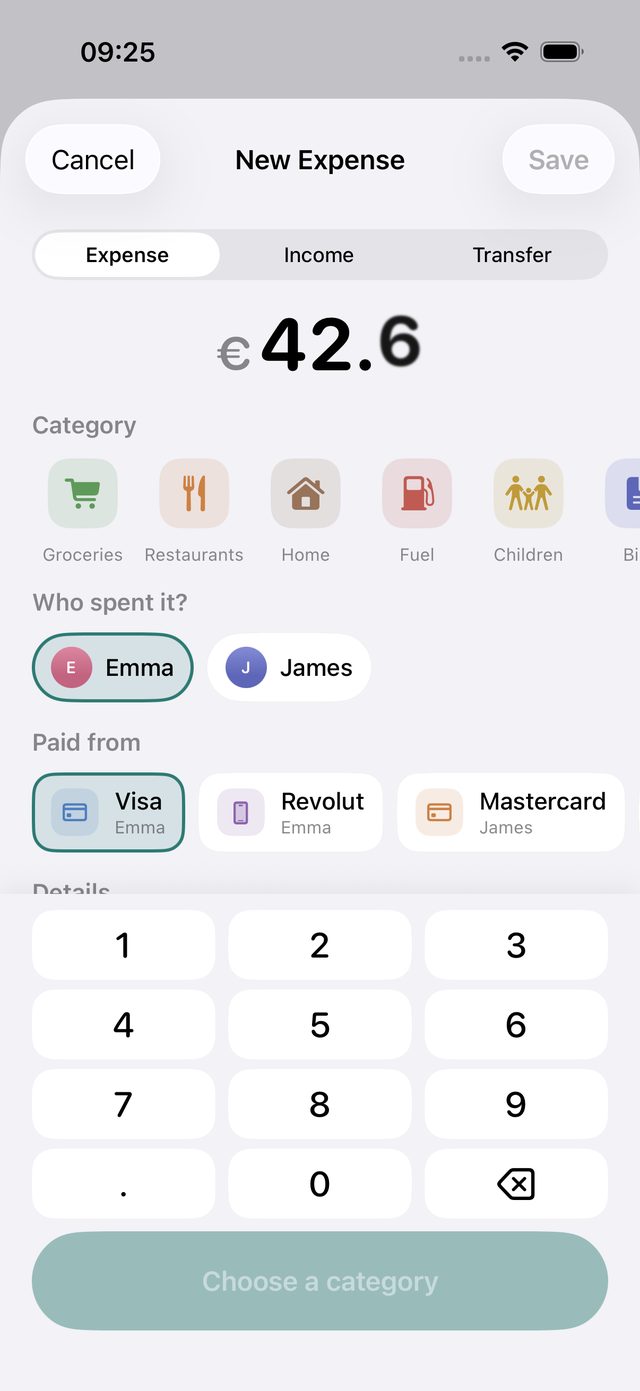
An expense in a few seconds
Type the amount, tap a category, who spent it and which card paid. All on one screen.
- The categories you use most come first
- Long-press Add Expense to log one again
- Deleted by mistake? Tap Undo
-
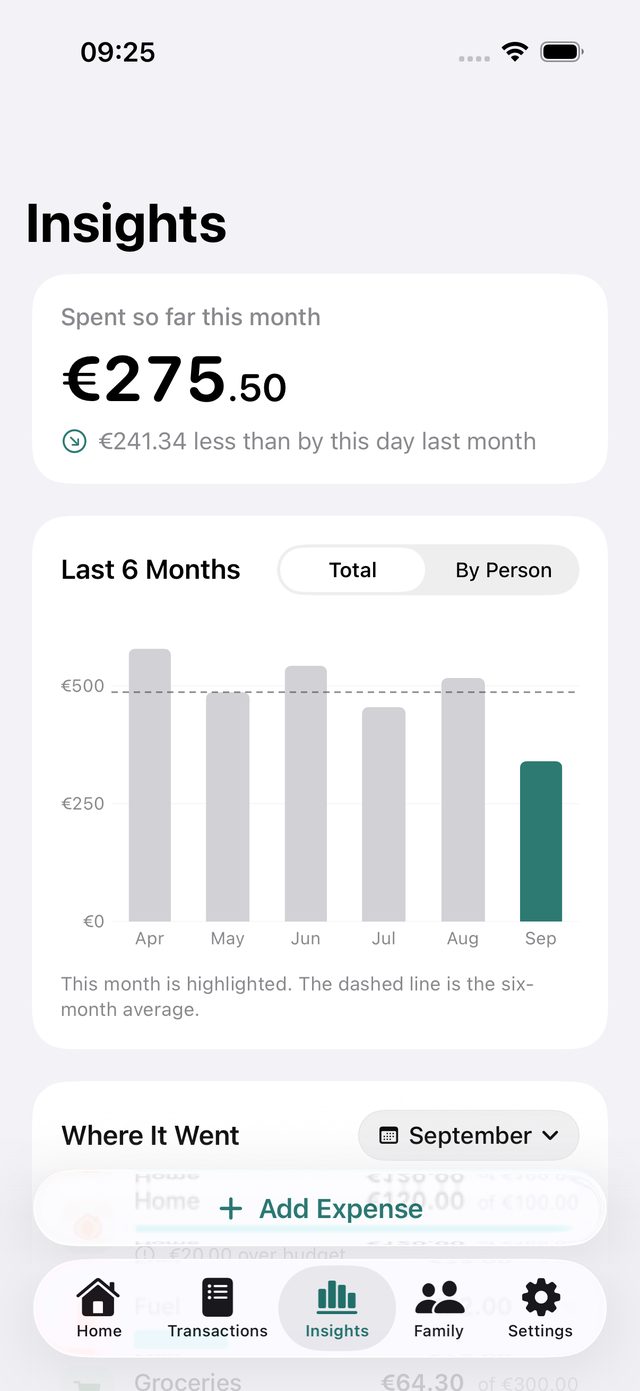
See where the money went
How this month compares with last, the last six months, and what you spend most on.
- This month vs. the same day last month
- Six-month trend, for the family or per person
- Top categories and their share
-
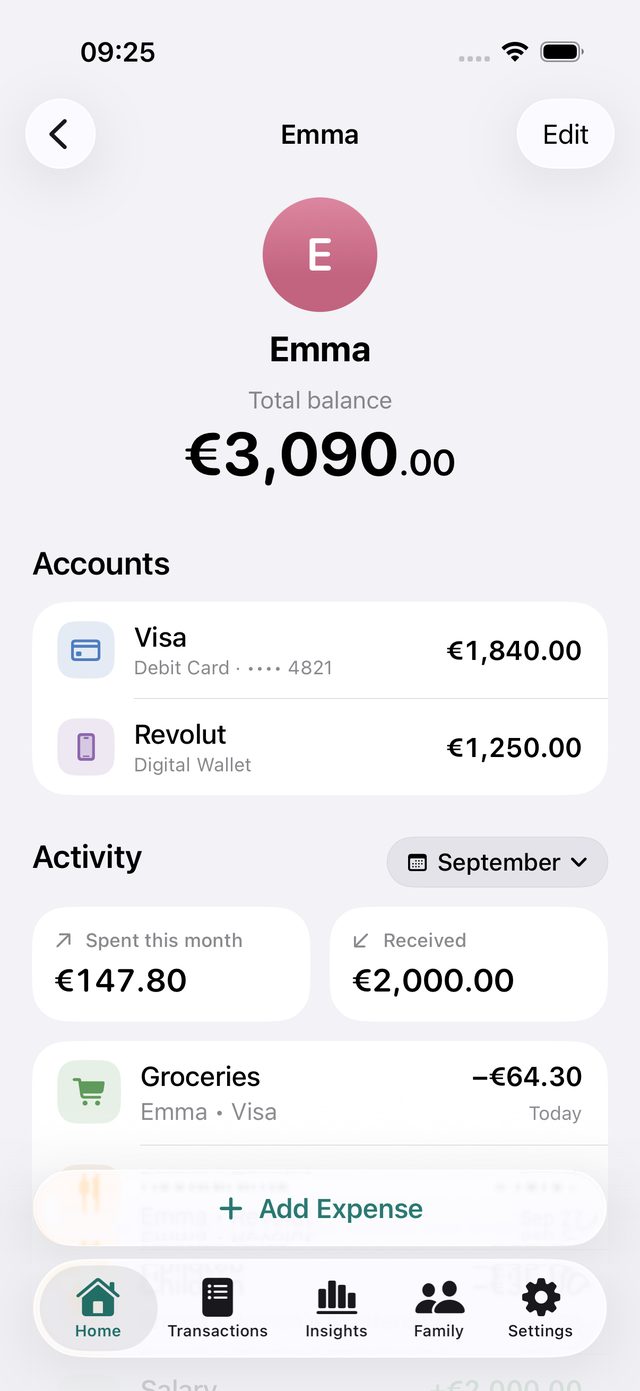
Everyone gets their own page
Tap a person to see their accounts, what they spent, what came in and their latest activity.
- Spending and income for any month
- Their cards and wallets in one list
- A photo or an emoji for everyone


Your family's finances stay at home.
Kunaa doesn't have an account to sign up for or a server to send your data to. Everything you enter lives on your iPhone.

No bank connections
You add what you spend yourself. Kunaa never asks for online banking logins.
Stored on your phone
No sign-up, no cloud account, no tracking. Nothing leaves the device unless you export it yourself.
Four digits, at most
To tell cards apart you can add their last four digits. Kunaa never stores full card numbers, CVVs or PINs.
Take your data anywhere
Export transactions to a spreadsheet, or back up everything to Files or iCloud Drive and restore it on a new iPhone.
Questions
When can I get Kunaa?
Kunaa already runs our own family's money, and it's being polished for the App Store. Join the waitlist and you'll get one email when it's out. Every signup tells us it's worth releasing, so it genuinely helps.
Will Kunaa really be free?
Yes. There's no subscription, no trial that runs out, and no paid tier you need for the basics.
Does it connect to my bank?
No. You record expenses and income yourself, which takes a few seconds each. It also means cash and cards from any bank work the same way.
Can each family member use it on their own phone?
Right now the household lives on one iPhone. Syncing between family members' phones is next on the list.
How do I get my data out, or move to a new phone?
In Settings, under Your Data, you can export every transaction as a CSV file for Numbers, Excel or Google Sheets. You can also save a full backup, photos included, to Files or iCloud Drive and restore it on another iPhone.
Which currencies does it support?
Euro for now. More currencies are planned.
What do I need to run it?
An iPhone with iOS 18 or later.
Why is it called Kunaa?
It comes from kuna, the Croatian word for marten, the animal on our icon. Marten pelts were once traded as money, which is how Croatia's currency before the euro got its name. The extra a makes the name our own.

Want Kunaa for your family?
Leave your email and we'll tell you the day it's on the App Store. Free, for iPhone with iOS 18 or later.
Almost there.
Two optional questions help us decide what to build first.
You're on the list.
Check your inbox for an email from Kunaa and tap the button to confirm.